# Dataset
**Store and export web scraping, crawling or data processing job results. Learn how to access and manage datasets in Apify Console or via API.**
***
Dataset storage enables you to sequentially save and retrieve data. A unique dataset is automatically created and assigned to each Actor run when the first item is stored.
Typically, datasets comprise results from web scraping, crawling, and data processing jobs. You can visualize this data in a table, where each object is forming a row and its attributes are represented as columns. You have the option to export data in various formats, including JSON, CSV, XML, Excel, HTML Table, RSS or JSONL.
> Named datasets are retained indefinitely. Unnamed datasets expire after 7 days unless otherwise specified. [Learn more](https://pr-2338.preview.docs.apify.com/platform/storage/usage.md#named-and-unnamed-storages)
Dataset storage is *append-only* - data can only be added and cannot be modified or deleted once stored.
## Basic usage
You can access your datasets in several ways:
* [Apify Console](https://console.apify.com) - provides an easy-to-understand interface.
* [Apify API](https://pr-2338.preview.docs.apify.com/api/v2.md) - to access your datasets programmatically.
* [Apify API client](https://pr-2338.preview.docs.apify.com/api.md) - to access your datasets from any Node.js/Python application.
* [Apify SDKs](https://pr-2338.preview.docs.apify.com/sdk.md) - when building your own JavaScript/Python Actor.
### Apify Console
In [Apify Console](https://console.apify.com), you can view your datasets in the [Storage](https://console.apify.com/storage) section under the [Datasets](https://console.apify.com/storage?tab=datasets) tab.
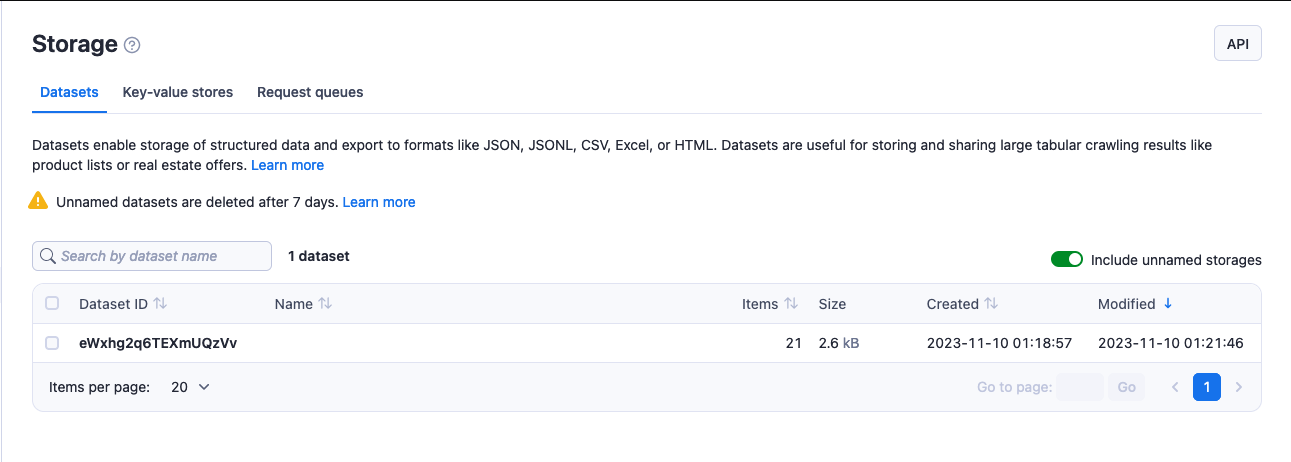
To view or download a dataset:
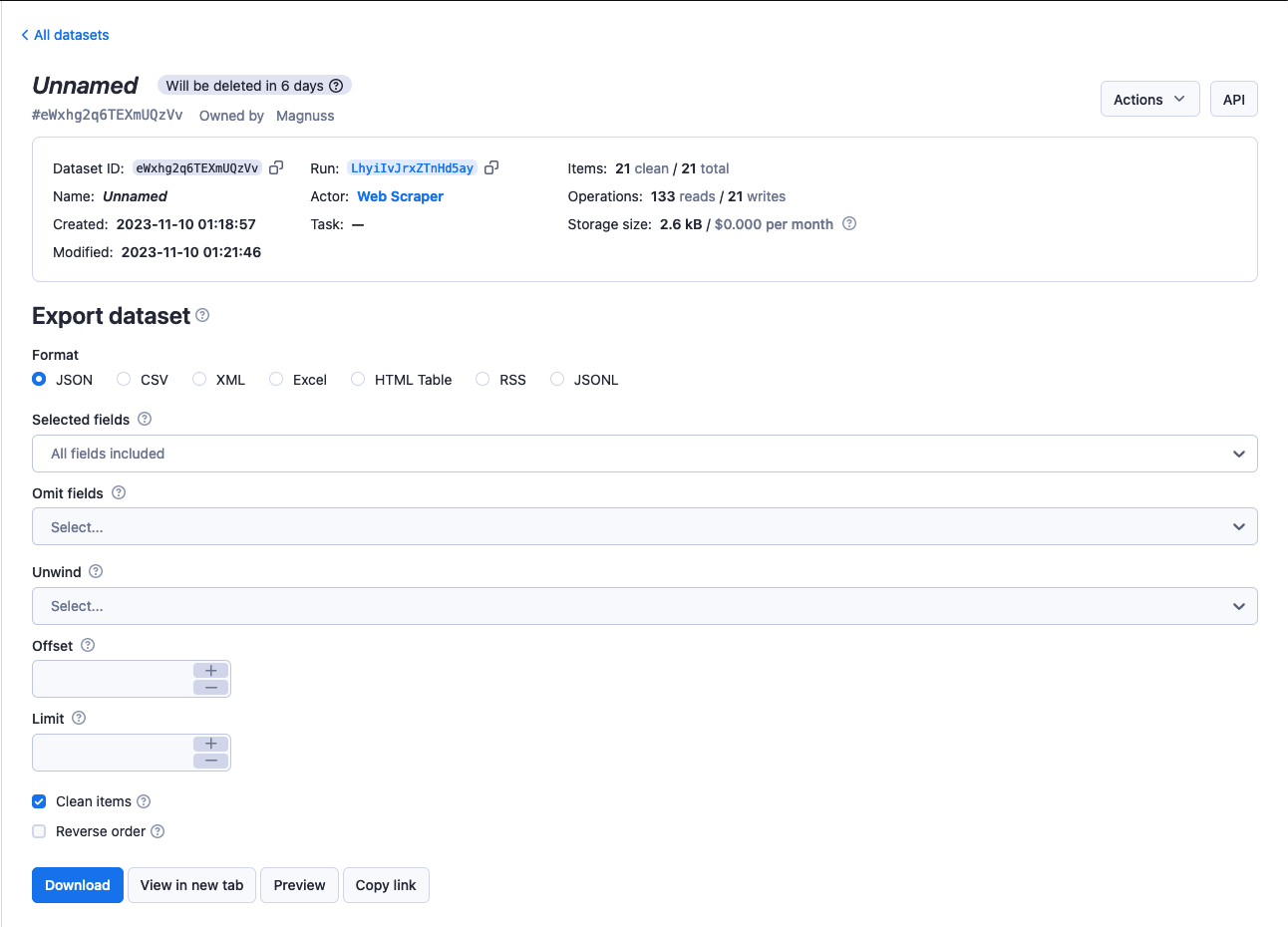
1. Click on its **Dataset ID**.
2. Select the format & configure other options if desired in **Export dataset** section.
3. Click **Download**.
Utilize the **Actions** menu to modify the dataset's name, which also affects its [retention period](https://pr-2338.preview.docs.apify.com/platform/storage/usage.md#data-retention), and to adjust [access rights](https://pr-2338.preview.docs.apify.com/platform/collaboration.md). The **API** button allows you to explore and test the dataset's [API endpoints](https://pr-2338.preview.docs.apify.com/api/v2/storage-datasets.md).
### Apify API
The [Apify API](https://pr-2338.preview.docs.apify.com/api/v2/storage-datasets.md) enables you programmatic access to your datasets using [HTTP requests](https://developer.mozilla.org/en-US/docs/Web/HTTP/Methods).
If you are accessing your datasets using the `username~store-name` [store ID format](https://pr-2338.preview.docs.apify.com/platform/storage.md), you will need to use your secret API token. You can find the token (and your user ID) on the [Integrations](https://console.apify.com/account#/integrations)tab of **Settings** page of your Apify account.
> When providing your API authentication token, we recommend using the request's `Authorization` header, rather than the URL. ([More info](https://pr-2338.preview.docs.apify.com/platform/integrations/api.md#authentication)).
To retrieve a list of your datasets, send a GET request to the [Get list of datasets](https://pr-2338.preview.docs.apify.com/api/v2/datasets-get.md) endpoint.
```
https://api.apify.com/v2/datasets
```
To get information about a dataset such as its creation time and item count, send a GET request to the [Get dataset](https://pr-2338.preview.docs.apify.com/api/v2/dataset-get.md) endpoint.
```
https://api.apify.com/v2/datasets/{DATASET_ID}
```
To view a dataset's data, send a GET request to the [Get dataset items](https://pr-2338.preview.docs.apify.com/api/v2/dataset-items-get.md) Apify API endpoint.
```
https://api.apify.com/v2/datasets/{DATASET_ID}/items
```
Control the data export by appending a comma-separated list of fields to the `fields` query parameter. Likewise, you can also omit certain fields using the `omit` parameter.
> If you fill both `omit` and `field` parameters with the same value, then >`omit` parameter will take precedence and the field is excluded from the >results.
In addition, you can set the format in which you retrieve the data using the `?format=` parameter. The available formats are `json`, `jsonl`, `csv`, `html`, `xlsx`, `xml` and `rss`. The default value is `json`.
To retrieve the `hotel` and `cafe` fields, you would send your GET request to the URL below.
```
https://api.apify.com/v2/datasets/{DATASET_ID}/items?format=json&fields=hotel%2Ccafe
```
> Use `%2C` instead of commas for URL encoding, as `%2C` represent a comma. For more on URL encoding check out [this page](https://www.url-encode-decode.com)
To add data to a dataset, issue a POST request to the [Put items](https://pr-2338.preview.docs.apify.com/api/v2/dataset-items-post.md) endpoint with the data as a JSON object payload.
```
https://api.apify.com/v2/datasets/{DATASET_ID}/items
```
> API data push to a dataset is capped at *400 requests per second* to avoid overloading our servers.
Example payload:
```
[
{
"foo": "bar"
},
{
"foo": "hotel"
},
{
"foo": "cafe"
}
]
```
For further details and a breakdown of each storage API endpoint, refer to the [API documentation](https://pr-2338.preview.docs.apify.com/api/v2/storage-datasets.md).
### Apify API Clients
#### JavaScript API client
The [JavaScript API client](https://pr-2338.preview.docs.apify.com/api/client/js/reference/class/DatasetClient) (`apify-client`) enables you access to your datasets from any Node.js application, whether hosted on the Apify platform or externally.
After importing and initiating the client, you can save each dataset to a variable for easier access.
```
const myDatasetClient = apifyClient.dataset('jane-doe/my-dataset');
```
You can then use that variable to [access the dataset's items and manage it](https://pr-2338.preview.docs.apify.com/api/client/js/reference/class/DatasetClient).
> When using the [.listItems()](https://pr-2338.preview.docs.apify.com/api/client/js/reference/class/DatasetClient#listItems) method, if you fill both `omit` and `field` parameters with the same value, then `omit` parameter will take precedence and the field is excluded from the results.
Check out the [JavaScript API client documentation](https://pr-2338.preview.docs.apify.com/api/client/js/reference/class/DatasetClient) for [help with setup](https://pr-2338.preview.docs.apify.com/api/client/js/docs) and more details.
#### Python API client
The [Python API client](https://pr-2338.preview.docs.apify.com/api/client/python/reference/class/DatasetClient) (`apify-client`) enables you access to your datasets from any Python application, whether it is running on the Apify platform or externally.
After importing and initiating the client, you can save each dataset to a variable for easier access.
```
my_dataset_client = apify_client.dataset('jane-doe/my-dataset')
```
You can then use that variable to [access the dataset's items and manage it](https://pr-2338.preview.docs.apify.com/api/client/python/reference/class/DatasetClient).
> When using the [.list_items()](https://pr-2338.preview.docs.apify.com/api/client/python/reference/class/DatasetClient#list_items) method, if you fill both `omit` and `field` parameters with the same value, then `omit` parameter will take precedence and the field is excluded from the results.
Check out the [Python API client documentation](https://pr-2338.preview.docs.apify.com/api/client/python/reference/class/DatasetClient) for [help with setup](https://pr-2338.preview.docs.apify.com/api/client/python/docs/overview/introduction) and more details.
### Apify SDKs
#### JavaScript SDK
When working with a JavaScript [Actor](https://pr-2338.preview.docs.apify.com/platform/actors.md), the [JavaScript SDK](https://pr-2338.preview.docs.apify.com/sdk/js/docs/guides/result-storage#dataset) is an essential tool, especially for dataset management. It simplifies the tasks of storing and retrieving data, seamlessly integrating with the Actor's workflow. Key features of the SDK include the ability to append data, retrieve what is stored, and manage dataset properties effectively. Central to this functionality is the [Dataset](https://pr-2338.preview.docs.apify.com/sdk/js/reference/class/Dataset) class. This class allows you to determine where your data is stored - locally or in the Apify cloud. To add data to your chosen datasets, use the [pushData()](https://pr-2338.preview.docs.apify.com/sdk/js/reference/class/Dataset#pushData) method.
Additionally the SDK offers other methods like [getData()](https://pr-2338.preview.docs.apify.com/sdk/js/reference/class/Dataset#getData), [map()](https://pr-2338.preview.docs.apify.com/sdk/js/reference/class/Dataset#map), and [reduce()](https://pr-2338.preview.docs.apify.com/sdk/js/reference/class/Dataset#reduce). For practical applications of these methods, refer to the [example](https://pr-2338.preview.docs.apify.com/sdk/js/docs/examples/map-and-reduce) section.
If you have chosen to store your dataset locally, you can find it in the location below.
```
{APIFY_LOCAL_STORAGE_DIR}/datasets/{DATASET_ID}/{INDEX}.json
```
`DATASET_ID` refers to the dataset's *name* or *ID*. The default dataset will be stored in the *default* directory.
To add data to the default dataset, you can use the example below:
```
// Import the JavaScript SDK into your project
import { Actor } from 'apify';
await Actor.init();
// ...
// Add one item to the default dataset
await Actor.pushData({ foo: 'bar' });
// Add multiple items to the default dataset
await Actor.pushData([{ foo: 'hotel' }, { foo: 'cafe' }]);
// ...
await Actor.exit();
```
> It's crucial to use the `await` keyword when calling `pushData()`, to ensure data storage completes before the Actor process terminates.
If you want to use something other than the default dataset, e.g. a dataset that you share between Actors or between Actor runs, you can use the [Actor.openDataset()](https://pr-2338.preview.docs.apify.com/sdk/js/reference/class/Actor#openDataset) method.
```
import { Actor } from 'apify';
await Actor.init();
// ...
// Save a named dataset to a variable
const dataset = await Actor.openDataset('some-name');
// Add data to the named dataset
await dataset.pushData({ foo: 'bar' });
// ...
await Actor.exit();
```
Utilize the `fields` option in the [getData()](https://pr-2338.preview.docs.apify.com/sdk/js/reference/class/Dataset#getData) method to specify which data fields to retrieve. This option accepts an array of fields names (string) to include in your results.
```
import { Actor } from 'apify';
await Actor.init();
// ...
const dataset = await Actor.openDataset();
// Only get the 'hotel' and 'cafe' fields
const hotelAndCafeData = await dataset.getData({
fields: ['hotel', 'cafe'],
});
// ...
await Actor.exit();
```
Check out the [JavaScript SDK documentation](https://pr-2338.preview.docs.apify.com/sdk/js/docs/guides/result-storage#dataset) and the `Dataset` class's [API reference](https://pr-2338.preview.docs.apify.com/sdk/js/reference/class/Dataset) for details on managing datasets with the JavaScript SDK.
#### Python SDK
For Python [Actors](https://pr-2338.preview.docs.apify.com/platform/actors.md), the [Python SDK](https://pr-2338.preview.docs.apify.com/sdk/python/docs/concepts/storages#working-with-datasets) is essential. The dataset is represented by a [Dataset](https://pr-2338.preview.docs.apify.com/sdk/python/reference/class/Dataset) class. You can use this class to specify whether your data is stored locally or in the Apify cloud and push data to the datasets of your choice using the [push_data()](https://pr-2338.preview.docs.apify.com/sdk/python/reference/class/Dataset#push_data) method. For further data manipulation you could also use other methods such as [get_data()](https://pr-2338.preview.docs.apify.com/sdk/python/reference/class/Dataset#get_data), [map()](https://pr-2338.preview.docs.apify.com/sdk/python/reference/class/Dataset#map) and [reduce()](https://pr-2338.preview.docs.apify.com/sdk/python/reference/class/Dataset#reduce).
For datasets stored locally, the data is located at the following path:
```
{APIFY_LOCAL_STORAGE_DIR}/datasets/{DATASET_ID}/{INDEX}.json
```
The `DATASET_ID` refers to the dataset's *name* or *ID*. The default dataset will be stored in the *default* directory.
To add data to the default dataset, you can use the example below:
```
from apify import Actor
async def main():
async with Actor:
# Add one item to the default dataset
await Actor.push_data({'foo': 'bar'})
# Add multiple items to the default dataset
await Actor.push_data([{'foo': 'hotel'}, {'foo': 'cafe'}])
```
If you want to use something other than the default dataset, e.g. a dataset that you share between Actors or between Actor runs, you can use the [Actor.open_dataset()](https://pr-2338.preview.docs.apify.com/sdk/python/reference/class/Actor#open_dataset) method.
```
from apify import Actor
async def main():
async with Actor:
# Save a named dataset to a variable
dataset = await Actor.open_dataset(name='some-name')
# Add data to the named dataset
await dataset.push_data({'foo': 'bar'})
```
Utilize the `fields` option in the [get_data()](https://pr-2338.preview.docs.apify.com/sdk/python/reference/class/Dataset#get_data) method to specify which data fields to retrieve. This option accepts an array of fields names (string) to include in your results.
```
from apify import Actor
async def main():
async with Actor:
dataset = await Actor.open_dataset()
# Only get the 'hotel' and 'cafe' fields
hotel_and_cafe_data = await dataset.get_data(fields=['hotel', 'cafe'])
```
For more information, visit our [Python SDK documentation](https://pr-2338.preview.docs.apify.com/sdk/python/docs/concepts/storages#working-with-datasets) and the `Dataset` class's [API reference](https://pr-2338.preview.docs.apify.com/sdk/python/reference/class/Dataset) for details on managing datasets with the Python SDK.
## Hidden fields
Fields in a dataset that begin with a `#` are treated as hidden. You can exclude these fields when downloading data by using either `skipHidden=1` or `clean=1` in your query parameters. This feature is useful for excluding debug information from the final dataset output.
The following example demonstrates a dataset record with hidden fields, including HTTP response and error details.
```
{
"url": "https://example.com",
"title": "Example page",
"data": {
"foo": "bar"
},
"#error": null,
"#response": {
"statusCode": 201
}
}
```
Data excluding hidden fields, termed as "clean" data, can be downloaded from the [Apify Console](https://console.apify.com/storage?tab=datasets) using the **Clean items** option. Alternatively, you can download it via API by applying `clean=true` or `clean=1` as [URL parameters](https://pr-2338.preview.docs.apify.com/api/v2/dataset-items-get.md).
## XML format extension
In `XML` and `RSS` export formats, object property name are converted into XML tags, and their corresponding values are represented as children of these tags.
For example, the JavaScript object:
```
{
name: 'Rashida Jones',
address: [
{
type: 'home',
street: '21st',
city: 'Chicago',
},
{
type: 'office',
street: null,
city: null,
},
],
}
```
becomes the following XML snippet:
```
Rashida Jones
home
21st
Chicago
office
```
In a JavaScript object, if a property is named `@`, its sub-properties are exported as attributes of the corresponding parent XML element. Additionally, when the parent XML element lacks child elements, its value is sourced from a property named `#` in the JavaScript Object.
For example, the following JavaScript object:
```
{
address: [
{
'@': {
type: 'home',
},
street: '21st',
city: 'Chicago',
},
{
'@': {
type: 'office',
},
'#': 'unknown',
},
],
}
```
will be transformed to the following XML snippet:
```
21st
Chicago
unknown
```
This feature is also useful when customizing your RSS feeds generated for various websites.
By default, the whole result is wrapped in an `` element, while each page object is contained in an `